Zalith Launcher vs Mojo Launcher | LTW Renderer Performance and Core Comparison
Minecraft Java Edition was originally designed for PC users but mobile gamers now want the same experience on Android devices. To meet this demand, third party launchers have emerged. Two popular options are Mojo Launcher and Zalith Launcher. Both allow Java Edition to run on mobile devices but differ significantly in performance, mod support and customization.
Mobile Minecraft launchers enable players to enjoy the Java Edition on smartphones. Unlike the official launcher which is only for PC, these tools allow installation, version selection, mod usage, and performance tuning on mobile devices. They bridge the gap between console/PC features and mobile convenience.
What is Mojo Launcher
Mojo Launcher is a beginner-friendly Minecraft mobile launcher designed for quick access to Java Edition on Android. Its main focus is simplicity and easy setup.
Key Features:
Note: Not optimized for heavy mods or advanced customization.
What is Zalith Launcher
Focuses on performance optimization and customization. It is ideal for users who want full control over how Minecraft runs on mobile.
Key Features:
this is best for modded gameplay and high-performance tuning.
Performance Comparison
Mojo Launcher:
Zalith Launcher:
Mod Support Comparison
Mojo Launcher: Basic mod support suitable for casual players.
Zalith Launcher: Extensive mod support including Fabric and Forge. Perfect for modded gameplay.
Shader Compatibility
Mojo Launcher: Can run shaders but may drop FPS on mid-range or low-end devices.
Zalith Launcher: Optimized to run shaders efficiently while balancing graphics and FPS.
Customization Features
Mojo Launcher: Minimal customization.
Zalith Launcher:
Device Compatibility
Mojo Launcher: Works well on modern mid-range devices.
Zalith Launcher2: Compatible with low-end, mid-range, and high-end devices thanks to advanced memory and resource optimization.
User Experience
Mojo Launcher: Simple and clean interface for casual players.
Zalith Launcher: Advanced controls for power users, requires learning but highly flexible.
Stability and Reliability
Mojo Launcher: Stable for vanilla gameplay but may struggle with heavy mods.
Zalith Launcher: Maintains stability even in heavily modded environments.
Ease of Use
Mojo Launcher: Beginner-friendly, very easy setup.
Zalith Launcher: Slightly complex due to advanced features, but rewards users with better performance and control.
Advanced Settings and Controls
Features:
Mojo Launcher: Minimal settings, keeps things simple.
Graphics Performance
Mojo Launcher: Decent for standard gameplay.
Zalith Launcher: Optimized for shaders, textures and enhanced visuals without FPS drops.
Memory Optimization
Mojo Launcher: Standard memory usage may lag with heavy mods.
Zalith Launcher: Memory allocation controls reduce crashes and improve stability.
Long Term Usability
Mojo Launcher: Good for casual play.
Zalith Launcher: Ideal for dedicated players with heavy modded gameplay and long term tuning.
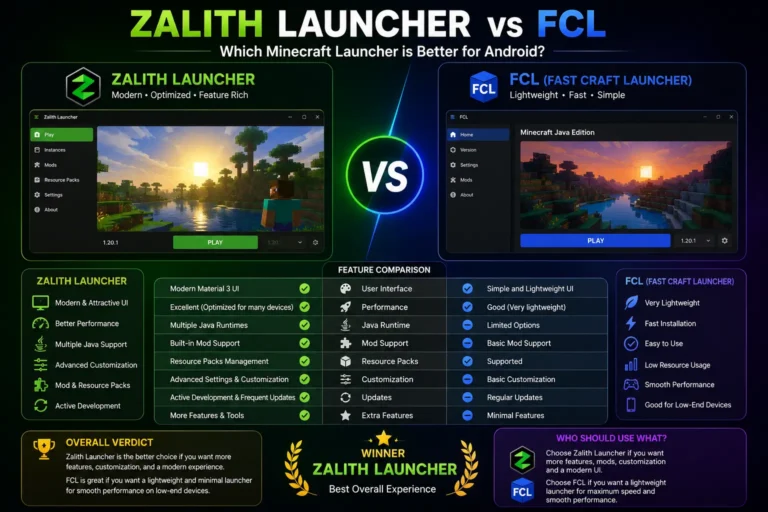
Feature Comparison Table
| Feature | Mojo Launcher | Zalith Launcher |
| Target Users | Beginners, casual players | Power users, modders |
| Performance | Stable for vanilla gameplay | Optimized for high FPS, smooth gameplay |
| Mod Support | Basic mods | Extensive mods (Fabric, Forge) |
| Shader Support | Limited, may lag | Optimized for shaders with performance tweaks |
| Customization | Minimal | Advanced (RAM, graphics, FPS) |
| Device Compatibility | Modern mid-range devices | Low-end, mid-range, high-end devices |
| User Interface | Simple, clean | Slightly complex, advanced options |
| Memory Optimization | Standard | Advanced RAM and resource management |
| Ease of Use | Beginner-friendly | Learning curve for advanced features |
| Long Term Usability | Casual use | Heavy modded gameplay, long-term performance |
| Graphics Performance | Decent for basic gameplay | Enhanced visuals without major FPS drops |
| Stability | Reliable for vanilla Minecraft | Stable even with heavy mods and shaders |
Beginner Friendly Comparison
Mojo Launcher is beginner-focused. Simple interface and minimal settings make it easy to start playing Minecraft on mobile. Zalith Launcher requires learning but provides full control once mastered.
Power User Comparison
Mojo Launcher: Limited customization, less suited for mods.
Zalith Launcher: Advanced customization, perfect for modpacks, shaders and performance tuning.
Pros of Mojo Launcher
Pros of Zalith Launcher
Limitations of Mojo Launcher
Limitations of Zalith Launcher
Which Launcher is Better for Mods
Zalith Launcher is superior due to support for Fabric, Forge and large modpacks.
Which Launcher is Better for Performance
Zalith Launcher provides smoother gameplay with memory optimization, FPS control and shader management.
Which Launcher is Better for Beginners
Mojo Launcher is beginner-friendly. Zalith Launcher can be used by beginners but offers advanced features for better control.
Which Launcher is Better for Customization
Its allows full control over RAM, graphics, mods and FPS for optimal performance.
Final Comparison
In the final comparison, Zalith Launcher is the better choice for users who want pure performance, stability and smooth gameplay with the LTW Renderer, especially on low end or budget devices. Its lightweight core and optimized system help deliver consistent frame rates and less lag, making it ideal for performance focused users.
Mojo Launcher, on the other hand, is a great option for users who prefer customization, extra features and better visual control. It works well on mid range to high end devices, but it can feel slightly heavy on low end phones because of its feature rich core.
FAQs
This comparison helps users make a smart decision faster.