API / Library Plugins for Minecraft Java Edition: Complete Guide
API (Application Programming Interface) and Library Plugins are essential tools for Minecraft Java Edition mods. They act as bridges between the game and mods, providing functions, commands and compatibility features that ensure mods work properly together. Without these plugins, many mods will fail to load or may cause conflicts, crashes, or errors.
Popular API / Library Plugins include Fabric API and Quilted Fabric API. These plugins are lightweight, efficient and designed to work with their respective loaders. Installing them correctly ensures smooth gameplay, faster mod loading and fewer compatibility issues. This guide will cover what these plugins are, how to use them in Zalith Launcher, common issues, FAQs and tips for a stable modded experience.
Popular API / Library Plugins
API and library plugins provide essential tools and frameworks that mods rely on to function correctly. They simplify development, improve compatibility between mods, and enable advanced features without conflicts. Using the right APIs ensures smoother gameplay and a more stable modded Minecraft experience.
Fabric API
Fabric Popular API / Library Plugins include Fabric API and Quilted Fabric API. These plugins are lightweight, efficient and designed to work with their respective loaders. is the essential library for mods running on Fabric. It provides functions and tools that allow mods to communicate with the game engine and with each other. Most Fabric mods require this API to function properly.
- Advantages:
- Lightweight and fast
- Ensures mod compatibility
- Easy to install and update
- When to Use:
Always install Fabric API when using Fabric loader mods. Without it, most mods will not work.
Quilted Fabric API
Quilted Fabric API is the upgraded version of Fabric API, designed for the Quilt loader. It provides extra features, stability improvements, and ensures newer mods work efficiently.
- Advantages:
- Adds advanced functions for mods
- Improves compatibility between mods
- Future-proof support for upcoming Minecraft updates
- When to Use:
Install Quilted Fabric API when using Quilt loader mods to ensure proper functionality and stability.
API / Library Plugins Table
API / Library Plugins Table includes essential tools that support mods and custom features in Minecraft Java Edition. These plugins provide frameworks for other mods to work properly, ensure compatibility and reduce conflicts. They help manage game resources, improve stability and allow smooth integration of additional content. Using these API / Library Plugins creates a more reliable and optimized modded Minecraft experience.
| Plugin | Loader / Mod Support | Performance / Weight | Notes |
| Fabric API | Required for most Fabric mods | Lightweight, fast | Ensures mod compatibility, easy to install and update |
| Quilted Fabric API | Required for Quilt loader mods | Lightweight, fast | Adds advanced features, improves compatibility, future-proof support |
How to Use Install API / Library Plugins in Zalith Launcher
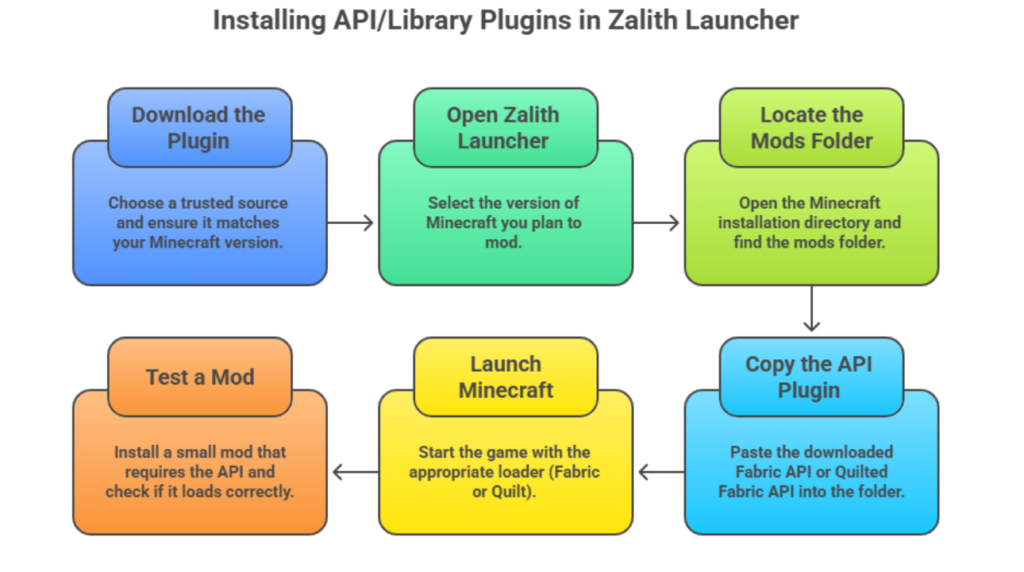
Installing API / Library Plugins correctly is crucial to avoid mod crashes. Follow these steps:
- Download the Plugin: Choose a trusted source and ensure it matches your Minecraft version.
- Open Zalith Launcher: Select the version of Minecraft you plan to mod.
- Locate the Mods Folder: Open the Minecraft installation directory and find the mods folder.
- Copy the API Plugin: Paste the downloaded Fabric API or Quilted Fabric API into the folder.
- Launch Minecraft: Start the game with the appropriate loader (Fabric or Quilt).
- Test a Mod: Install a small mod that requires the API and check if it loads correctly.
Tips:
Common Issues & Solutions
Read More: Graphics and Renderer Plugins for Minecraft Java Edition: Complete Guide
FAQs
FAQs
Users can quickly find what they need here.
Conclusion
API / Library Plugins are essential for running mods in Minecraft Java Edition. Fabric API is required for most Fabric mods, while Quilted Fabric API is needed for Quilt loader mods. Proper installation in Zalith Launcher, regular updates, and compatibility checks ensure smooth gameplay and fewer crashes. Using these plugins allows you to enjoy a wide variety of mods, enhances mod stability, and creates a reliable environment for a seamless modded Minecraft experience.