Mod Loaders for Minecraft Java Edition | ULTIMATE Beginners Guide for 2026!
Minecraft Mod Loaders are the foundation of any modded Minecraft experience. Without them, custom mods cannot run properly and attempting to use incompatible mods may cause crashes or errors. Mod Loaders act as a bridge between the game and modifications, allowing players to install, manage and run multiple mods safely. They also ensure that different mods work together without conflicts, making the game stable and enjoyable.
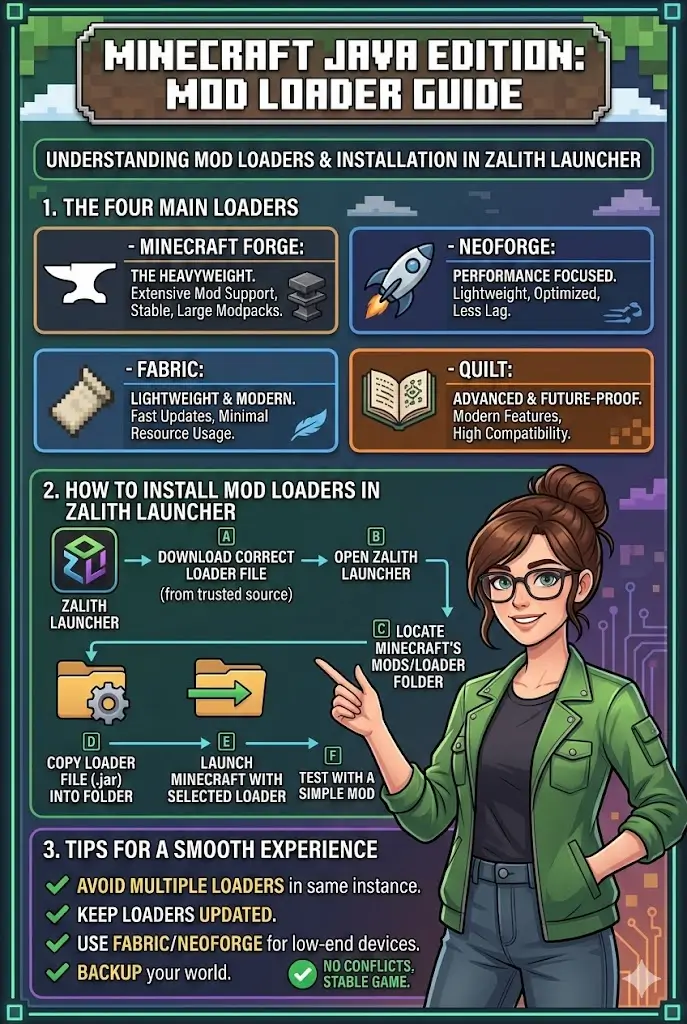
In Minecraft Java Edition, the most popular Mod Loaders are Minecraft Forge, NeoForge, Fabric and Quilt. Each of these has unique characteristics, advantages, and use cases. Choosing the right loader depends on the mods you want to use, your device’s performance and your preference for stability or speed.
This guide covers everything you need to know about Mod Loaders. You will learn which plugins to use, how to install them in Zalith Launcher, common issues and solutions, frequently asked questions, and tips for a smooth experience. By the end, you will be ready to mod your game efficiently and safely.
Popular Mod Loaders and Their Use
Popular Mod Loaders act as a bridge between Minecraft and mods, allowing players to safely install, manage and run custom modifications. Each loader has unique features and strengths, making some better for heavy modpacks, others for lightweight mods, and some for the latest Minecraft updates. Choosing the right loader ensures smooth gameplay, stability and compatibility with your favorite mods.
Minecraft Forge Mod Loaders
Minecraft Forge is the most widely used loader in the Minecraft community. It is highly stable, supports almost all popular mods and provides a strong framework for developers. Forge is ideal for players who want to use heavy mods or large modpacks, as it handles complex mod interactions efficiently.
- Advantages:
- Extensive mod support
- Beginner-friendly
- Works well with large modpacks
- When to Use:
Choose Forge when using multiple mods together or when mods require Forge specifically.
NeoForge Mod Loaders
NeoForge is a lightweight alternative to Forge. It is optimized for performance and works well on devices with limited resources. NeoForge allows smooth gameplay even with several mods installed and reduces lag significantly.
- Advantages:
- Fast and lightweight
- Stable for low-end devices
- Efficient memory usage
- When to Use:
Ideal for players with older or low-spec computers who want modded Minecraft without sacrificing performance.
Fabric Mod Loaders
Fabric is a modern, lightweight loader designed for fast updates. It supports newer Minecraft versions quickly and is popular among players who prefer smaller, lightweight mods. Fabric is easy to install and does not require as many system resources as Forge.
- Advantages:
- Lightweight and fast
- Quick updates for new Minecraft versions
- Minimal resource usage
- When to Use:
Use Fabric for fast performance, lightweight mods, or when you want to run mods on newer Minecraft updates.
Quilt Mod Loaders
Quilt is an advanced version of Fabric. It offers additional features, improved compatibility and future-proofing for Minecraft mods. Quilt ensures that mods work efficiently together and reduces conflicts. It is recommended for players who want the latest mods with advanced features and a highly compatible environment.
- Advantages:
- Modern features
- Improved compatibility
- Ideal for advanced and new mods
- When to Use:
Choose Quilt when running the latest mods and you need future-proof support with better performance.
| Mod Loaders | Plugin / Mod Support | Performance / Weight |
| Minecraft Forge | Almost all Forge mods,Large Mod Packs | Heavy, stable |
| NeoForge | Most Forge mods | Lightweight, optimized |
| Fabric | Fabric-specific mods only | Very lightweight, fast |
| Quilt | Fabric & Quilt-specific mods | Lightweight, modern features |
How to Install Minecraft Mod Loaders in Zalith Launcher
Installing Mod Loaders properly is essential to avoid crashes and conflicts. Follow these steps to install any loader safely:
- Choose the Correct Loader: Ensure the loader matches your Minecraft version and the mods you want to use.
- Download from a Trusted Source: Always download Mod Loaders from official websites to avoid malware or corrupted files.
- Open Zalith Launcher: Select the Minecraft version that matches the loader for compatibility.
- Locate the Mods or Loaders Folder: Open the Minecraft installation directory and find the appropriate folder for loader files.
- Copy the Loader File: Paste the downloaded loader into the folder. Do not compress unless required by the loader instructions.
- Launch Minecraft: Start the game using the loader. If installed correctly, the game should run without errors.
- Test with a Small Mod: Install a simple mod that requires the loader to ensure everything works correctly.
Tips for Best Performance:
Common Issues and Solutions in Mod Loaders
Even with proper installation, users may face issues with Mod Loaders. Here are the most common problems and their solutions:
FAQs
This information gives clear direction to solve problems.
Conclusion
Minecraft Mod Loaders are essential for modding Minecraft Java Edition. They allow players to run mods safely, avoid conflicts and enhance gameplay. Minecraft Forge is the most stable and beginner-friendly option, while Fabric and Quilt are best for lightweight, fast and modern mods. NeoForge is ideal for low end devices or players seeking better performance.
Proper installation in Zalith Launcher, testing mods with the loader, and keeping everything updated ensures a smooth, stable and enhanced Minecraft experience. By following this guide, you can enjoy the full potential of Minecraft mods, from small quality of life tweaks to large, immersive modpacks, without facing crashes or compatibility issues.